Intro
As you may know, I'm a passionate mechanical keyboard user. I've spent the past year or so experimenting with a new 32-key keyboard layout and I've got to the point now where I'm pretty happy with it. I've decided to give it a name, Arrow, and make its repository publicly available.
What is it
Arrow is a minimalist, ergonomic, and mnemonic keyboard layout.
- Minimalist: it primarily targets 32-key keyboards, with variants covering slightly smaller or larger keyboards too.
- Ergonomic: it minimises certain movements that can be a source of stress and causing injuries (purely based on personal experience, not medical evidence).
- Mnemonic: keys are allocated according to a pattern that should be easy to remember.
These are the design principles I followed:
- Arrow keys available on the primary layer
- Home-row modifiers (Command, Control, Meta, and two layer keys)
- No Shift modifier
- 4 layers (alphabet; numbers and symbols; uppercase alphabet; more symbols)
- The primary layer includes the English alphabet, the arrow keys, Enter, Space
- The secondary layers can be accessed by holding either or both layer keys
What does it look like
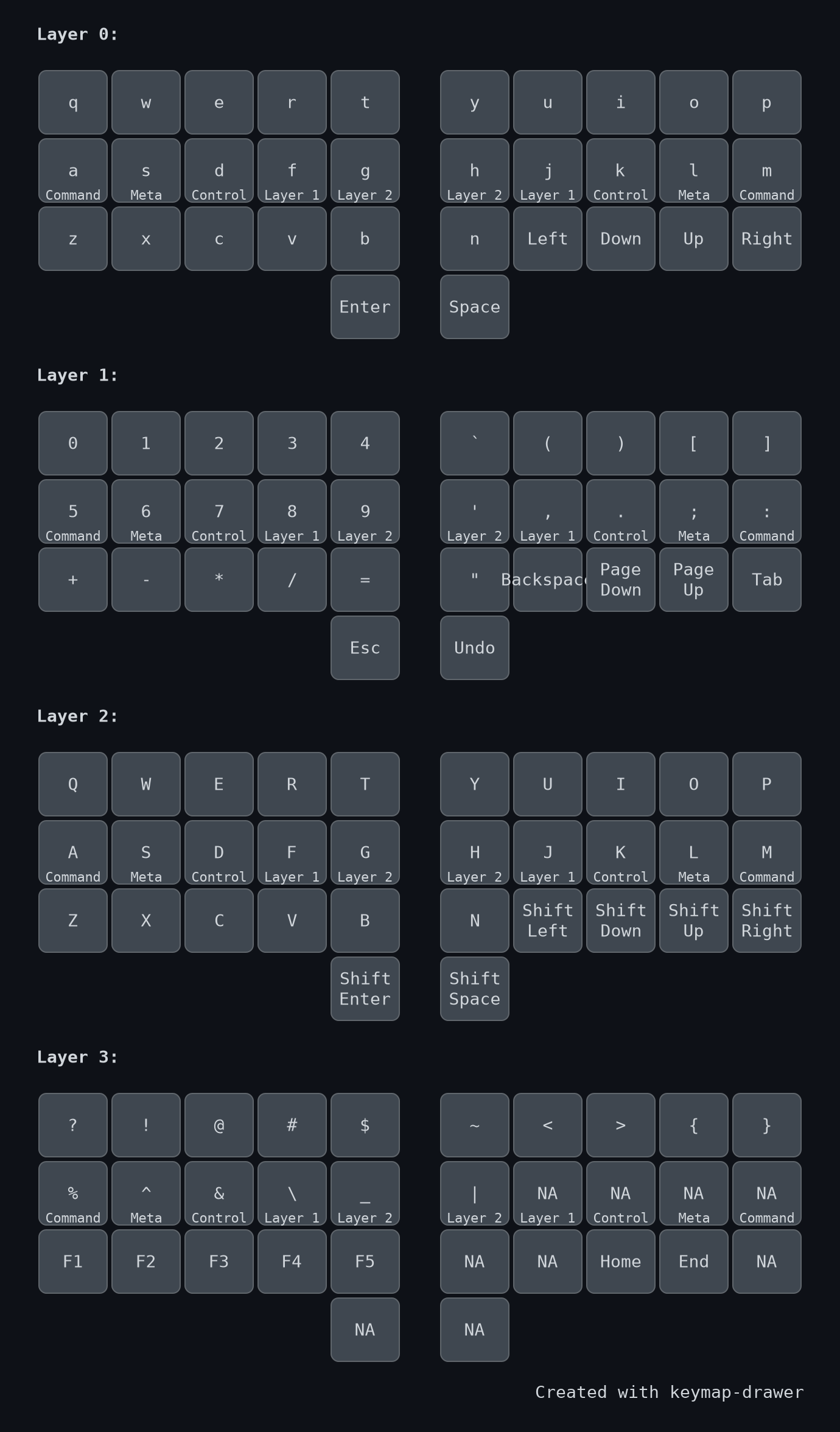
Figure 1: The Arrow layout, displayed using the keymap-drawer project.
And here is a textual representation:
Layer 0 (default):
q    w    e    r    t    y    u    i    o    p
a    s    d    f    g    h    j    k    l    m
z    x    c    v    b    n    ←    ↓    ↑    →
                    ENT  SPC

Layer 1:
0    1    2    3    4    `    (    )    [    ]
5    6    7    8    9    '    ,    .    ;    :
+    -    *    /    =    "    BSPC PGDN PGUP TAB
                    ESC  UNDO

Layer 2:
Q    W    E    R    T    Y    U    I    O    P
A    S    D    F    G    H    J    K    L    M
Z    X    C    V    B    N    S←   S↓   S↑   S→
                    SENT SSPC

Layer 3:
?    !    @    #    $    ~    <    >    {    }
%    ^    &    \    _    |    NA   NA   NA   NA
F1   F2   F3   F4   F5   NA   NA   HOME END  NA
                    NA   NA
Home-row modifiers across all layers:
- Left hand: Command, Meta, Control, Layer 1, Layer 2
- Right hand: Layer 2, Layer 1, Control, Meta, Command
Abbreviations:
- ENT = enter
- SPC = space
- BSPC = backspace
- PGDN = page down
- PGUP = page up
- NA = not assigned
- SENT = shift+enter
- SSPC = shift+space
- S← = shift+left (select left)
- S↓ = shift+down (select down)
- S↑ = shift+up (select up)
- S→ = shift+right (select right)
Key design decisions
Arrow keys on the primary layer
The arrow keys are included on the primary layer, therefore they can be accessed directly, without holding any modifier or layer key. Having arrow keys on a secondary layer is likely to determine prolonged use of the layer key, which may be a risk from an ergonomic point of view.
Home-row modifiers
Home-row modifiers may take some time to get used to, but can be extremely convenient once you overcome the subtle timing issues. Note that QMK's TAPPING_TERM setting significantly affects their behaviour and will likely need tuning to suit your typing style.
No Shift modifier
The absence of the Shift modifier is probably the most distinctive aspect of the layout. Instead of Shift, Arrow relies on a dedicated layer for uppercase letters. This approach makes it possible to freely (i.e. ergonomically and mnemonically) rearrange symbols across layers, ignoring the fact that some symbols are the result of pressing Shift and other keys.
QWERTY and alternatives
Arrow's alphabetic layout is a slight variation of QWERTY (with the letter "m" moved to the pinky column) but this can be easily changed to Dvorak, Colemak, and any other English-based alphabetic layout (some slight adjustment may be required to account for the arrow keys).
Implementations
The Arrow repository includes a QMK implementation. ZMK, KMonad, and Kanata ports are planned.
Outro
If you are into small ergonomic mechanical keyboards you may want to give this layout a try. If you do and have any feedback or idea, let me know via email or on the Fediverse!